WAVE automates backend testing
Manual testing and automation in one open source tool
One: you drag a block from the palette onto the canvas, and it connects to the block above it. Two: the view moves across one test that connects to SSH hosts, a remote Kubernetes API, OpenSearch and PostgreSQL. Three: you add an HTTP block with a keyboard shortcut, set it to TLS 1.3 and run that block by itself. When it finishes, the live trace shows the TLS handshake it made. Four: you watch a suite run live, set a breakpoint while it is running, press Step Over when the run stops there, and let the run finish with every test in the suite passing. Five: you publish a function built in one test to the shared library, then drop it into a second test as one block. Six: you reopen a finished run read-only, with its secret values masked, and generate a dated report.

Build your test on a visual canvas.
You drag a block onto the canvas for each step of the test: an HTTP call, an SSH command, a database query. You see the whole flow, not a wall of code.
Watch it run, one step at a time.
Set a breakpoint, look at any value in the middle of a run, and run any single block on its own.
Run a whole regression.
Start it from your CI through the REST API.
Every run has a report:
What was checked, what passed, what failed, how long it took, who triggered the run, and the full logs. Export the report as one HTML or JSON file.
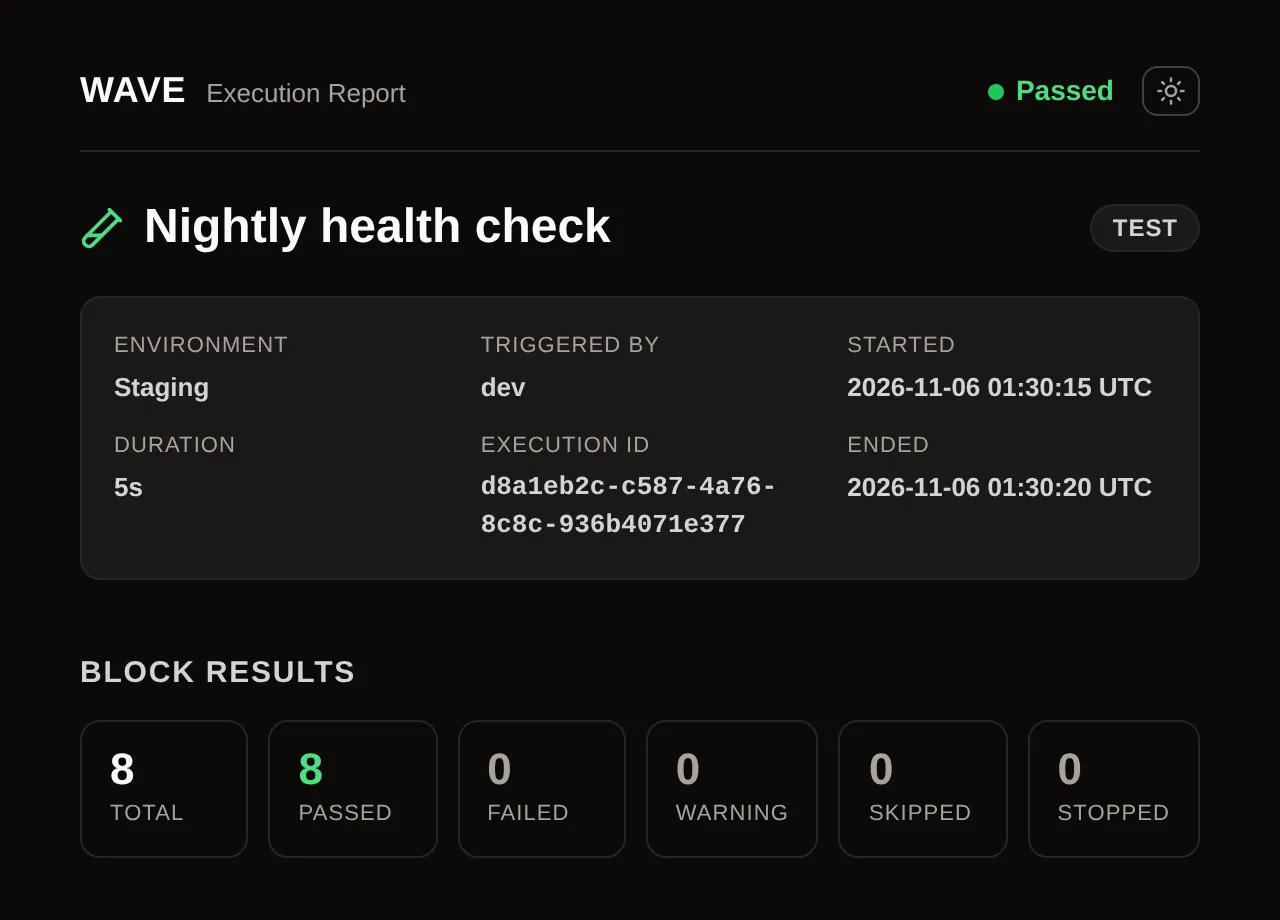
Every saved run is evidence you can reopen.
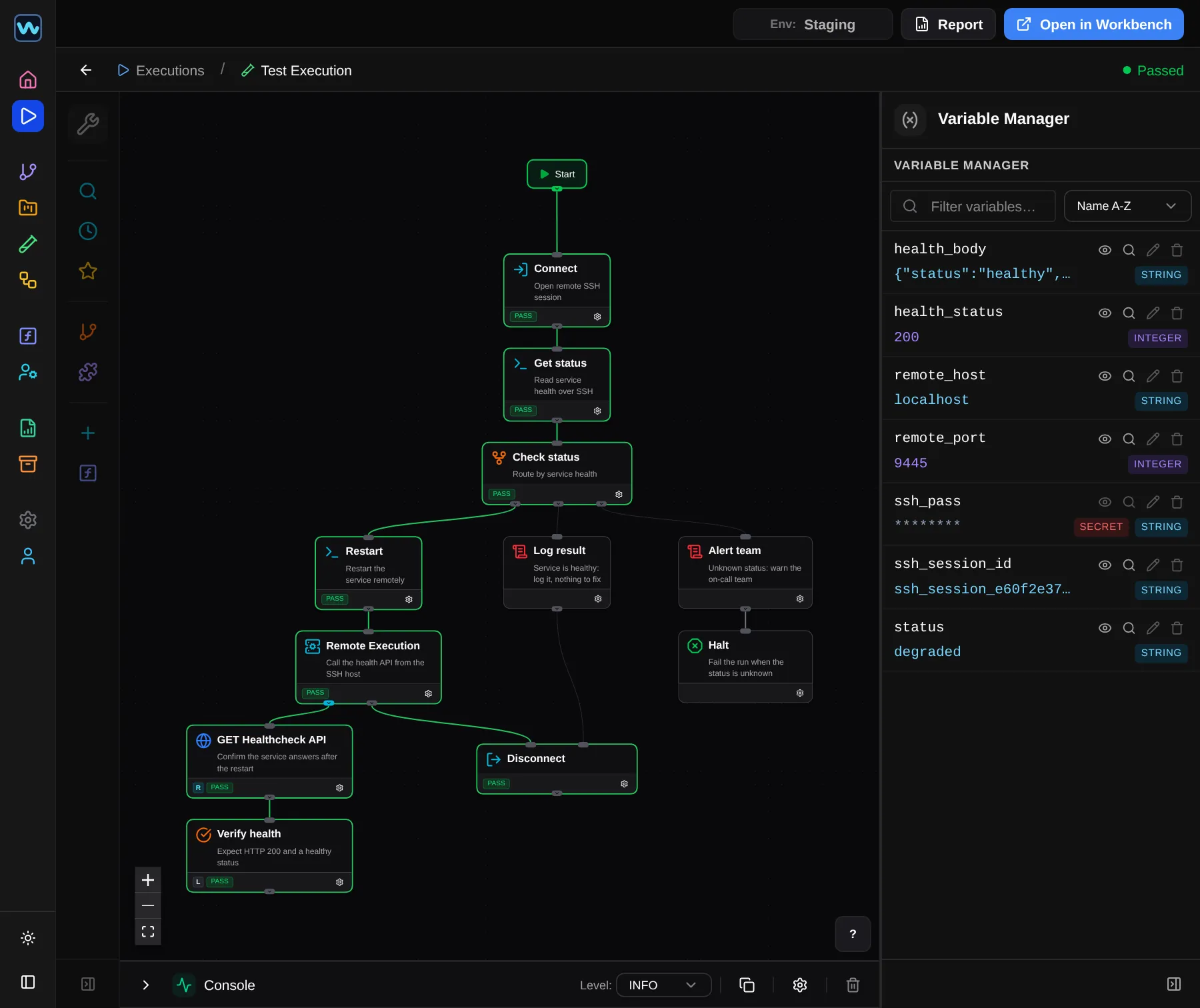
The exact test, with every block colored by its result.
WAVE saves every run started from a test, suite or regression page, or through the REST API or MCP. Open one from execution history and you get that run's values, its logs, and a click through to the full report.
Nothing runs again. Execution history is read-only.
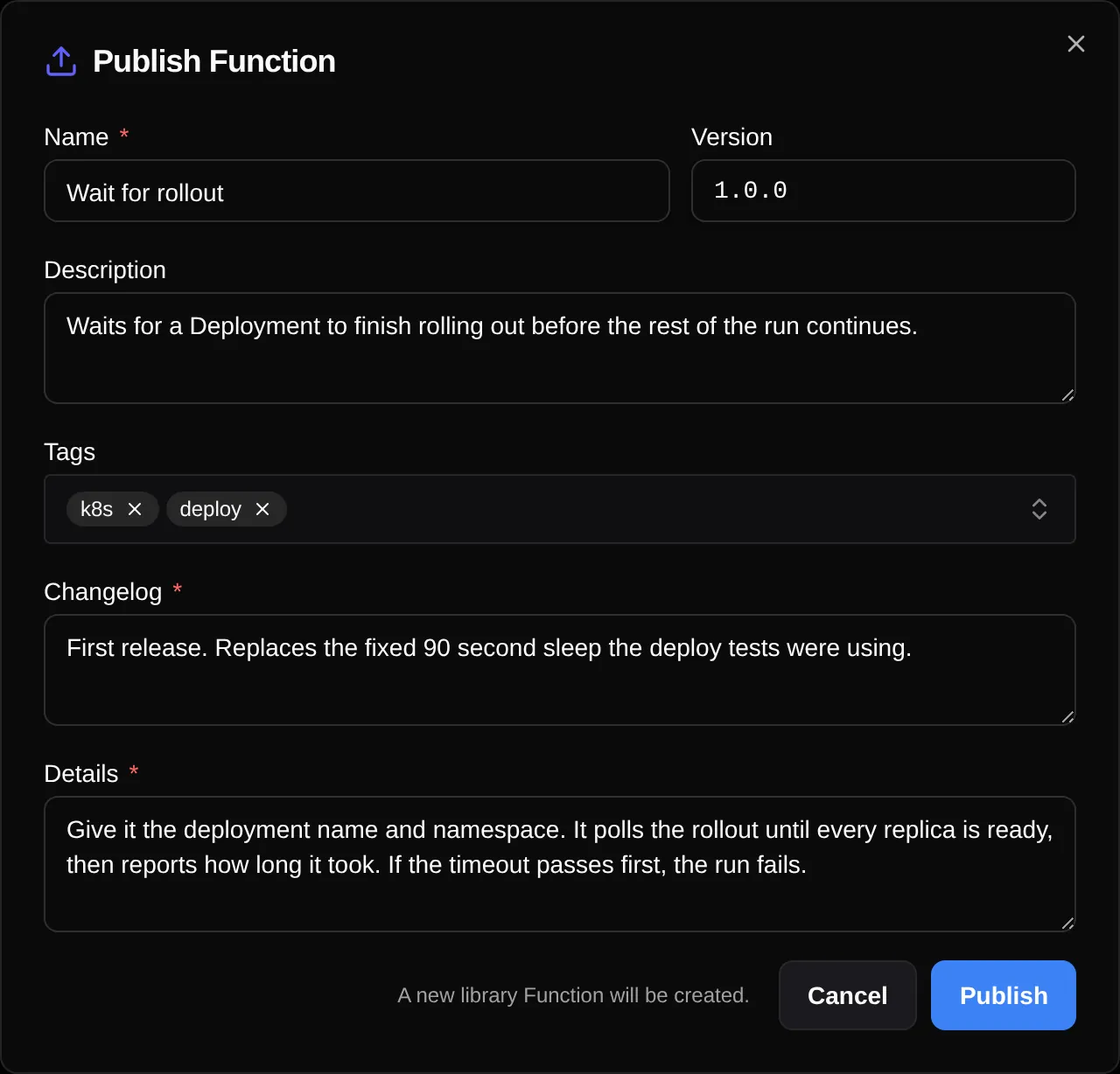
Build the hard part once. The whole team reuses it.
Save a block, or a whole piece of a test, to a shared library. Anyone can drop it into their own test as one block.
Publish it with a version number and a changelog. Each test uses it by reference, pinned to a version you choose. A breaking change to a function's inputs or outputs can only go out as a new major version, so anything pinned to the old one keeps working.
It runs inside your network, not in someone else's cloud.
WAVE runs on your own machine and does not collect your data. It reaches your systems the same way you do, on that machine or anywhere on your network. Once it is installed, it can run air-gapped.
You did not choose manual testing. You got here for two reasons.
First, there is never time. Automating is later. So you re-run the tests manually one more release, and one more, and the "later" never comes.
Second, the tools do not fit your environment. The tools that could really take this work off your hands assume the cloud. They phone home. In a regulated or air-gapped environment, that rules them out.
4 engineers, 6 full runs a year, 20 days per engineer per run.
This example leaves out two costs the calculator can also count: re-runs forced between releases, and the money you lose while a finished release waits on testing.
How these numbers work
4 engineers x 6 full runs x 20 days = 480 engineer-days of manual testing a year.
Take the $75 wage and double it for benefits, payroll tax, and overhead: $150 an hour. An 8-hour day is $1,200. So 480 engineer-days is $576,000 in year one.
The testing load grows because the test count grows: 1,000 tests today, 150 more a year. That is 15 percent, added in a straight line, not compounded. So every year adds $86,400 to the first year's cost. Year two is $662,400. Year three is $748,800.
In year one you build the tests, so the cut is smaller: half. $576,000 less 50 percent is $288,000. From year two the build is behind you and the cut is 60 percent. $662,400 less 60 percent is $264,960. $748,800 less 60 percent is $299,520. Those two percentages are numbers you set, not results.
What automation does not remove: the first build of each test, the upkeep as the product changes, and a person still checking each run.
Put your own numbers in the cost calculator to see your real cost.
The calculator shows you the cost of testing, in your own numbers.
It uses the true cost of an engineer's hour, not just the wage. It can count the re-runs and the waiting. And it shows you how the loss grows over the next few years if nothing changes.
Questions people ask.
What WAVE is
What is WAVE, exactly?
WAVE is test automation for your backend. You build a test by dragging blocks onto a canvas. You run it with breakpoints, the way you debug code. After that the same test runs again every release. WAVE runs on your own machine, on your own network. The name stands for Workflow Automation and Validation Engine.
Do I need to write code to use it?
No. A test is a diagram. There are Python and shell blocks for the parts where you do want code, and you pass values into them and take values back out.
How is this different from writing tests in pytest or Robot Framework?
The difference is how much you have to build before you get anything back. With a framework you learn it, then write the glue code.
In WAVE the test is a diagram on a canvas, and you run one block at a time while you build it.
Is this Postman with a flowchart, or just another workflow tool?
No. One test reaches several systems in the same run: an HTTP call, then a command on a server over SSH, then a query against a database, passing values along as it goes. And it has a debugger, so you can stop a run in the middle and change what it is holding.
What it does
What systems can WAVE reach today?
HTTP and HTTPS APIs. Linux servers over SSH, directly or through any number of jump hosts. Kubernetes, SQL databases, OpenSearch and SFTP. Files, including CSV and Excel. Ping, and a TCP or UDP port check. One test can reach several of these in the same run.
For anything that does not have its own block, use a Python or shell block. The whole list is on the features page.
Can I debug a test while it is running?
Yes. Set a breakpoint before the run or while it is running. When the run stops there you can look at any value it is holding and change it before you continue. You can step over a block, step into it, skip one, or continue. You can also run a single block on its own, or start the run at any block and continue from there.
What does a run leave behind?
Every run has a report. It shows how long each block took, who started the run, and the full log. You export it as one HTML file, or as JSON. WAVE saves every run started from a test, suite or regression page, or through the REST API or MCP. A saved run keeps any files it wrote, and stays as a read-only snapshot you can reopen and walk through block by block.
Does WAVE replace our CI, or run inside it?
WAVE does not replace your CI. Your CI can use the REST API to start a run and read the result.
Does WAVE need AI, and does anything I write go to a model?
No. What you write goes to a model only if an AI assistant connects to WAVE. There is no AI model in WAVE yet, and WAVE calls none.
The assistant connects to an MCP server in WAVE, which is off until you turn it on. Once connected, the assistant can read your tests, write or change one, start a run, and read the results. What it reads goes to the model that assistant uses, wherever that model runs.
Getting started
How long before we have our first automated test?
It depends on whether WAVE already reaches every system your first test has to touch. The features page lists what it reaches. If they are all there, there is nothing to build first. You put the blocks on the canvas and run it.
If one is missing, you write that part of the test yourself, in a Python or shell block.
We are a team of four. Can we all use it today?
Yes. Each engineer runs WAVE on their own machine.
Tests are stored as plain text files in a directory you choose, so you can keep them in version control. A change to a test shows up as readable text. You can also export tests, suites and test data on one machine and import them on another.
Your data and your network
Does any of our data leave our environment?
No. WAVE runs on your own machine, on your own network. There is no account to create. No telemetry and no update check. Every connection out is one you started, to an address you set.
A debug trace leaves only if you send it. You choose what goes in it, and you can report a bug without sending one. If you connect an AI assistant to WAVE, what it reads goes to the model that assistant uses.
Does it work with no internet at all?
Yes, once it is installed. Nothing in WAVE needs the internet to run: no account, no telemetry, no update check.
Where do secrets live, and what protects them?
Mark a variable as secret and WAVE masks it by default everywhere it appears: in logs, in reports and on screen. It is encrypted when it is saved, including inside the test files on your disk.
When you export a profile you choose whether its secrets go out masked, still encrypted, or in plain text. Masked is the default.
The source code
What license is WAVE under, and where is the code?
The MIT license. The source code is on GitHub. It is in alpha. You can use it at work, change it and share it. If you share it, keep the license file with it. The license file in the repository has the exact terms.
Can I see it running?
Yes. There is a video tour on this page. It is a recording of the product. To run WAVE yourself, get the source code from GitHub. The readme there says how to start it.
Can I change WAVE to fit our systems?
Yes. The MIT license lets you change the code, and you do not have to publish your changes. For a system that has no block of its own, you can use a Python or shell block without changing WAVE.
What happens to our tests if work on WAVE stops?
Your tests are plain text files in a directory you chose, on your own disk, and they stay readable without WAVE. Your reports export as HTML files that open without WAVE. You can keep running and changing the code you have, under the MIT license.
WAVE is looking for design partners.
Design partners run WAVE against their own systems and report, in private, where it falls short.